

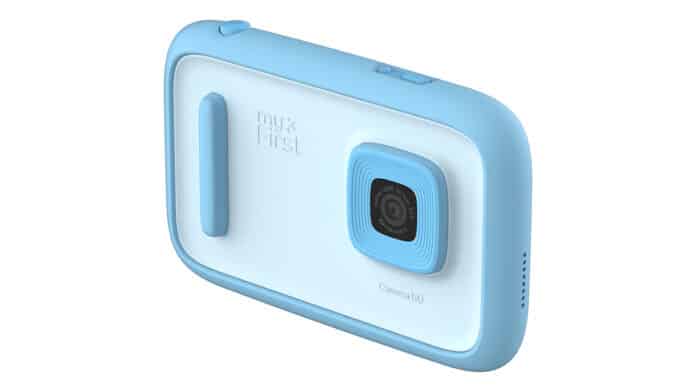

Looking for a nice bit of technology for the kids this Christmas but don’t want to give in and let them join the smartphone craze? Well myFirst Camera 50 might just be the answer. The device looks a bit like a smartphone and it’s aimed at kids who are dipping their toes into the water of content creation. Available in two colours – blue and pink – the myFirst Camera 50 brings together photography and video recording, along with some other engaging features for young kids.
Unlike the myFirst Camera Insta 20, the my First Camera 50 doesn’t allow you to print from the device but there are a lot more options available. The camera fits nicely in the hand and it features a selfie light, with adjustable brightness, on the back. The screen on the back is fairly large and it’s touchscreen too, meaning you don’t have to fiddle around with buttons to navigate around. The main appeal of this camera is going to be the ability to take photos and record video. With a 20MP main camera, a 16MP selfie camera and video that records at 1080p@30fps, the device boasts an internal memory of 16GB. If you want more space you can add a memory card via the slot at the side but for most kids, the internal memory should be plenty.
The myFirst Camera 50 is easy enough to use. When you first set it up, you need to down the myFirst Circle app. This allows you to connect to the device and you can assign it to a profile created for your child. The myFirst Circle app is a parent-controlled social media app where kids can share photos and videos, but parents get the ultimate say so they can ensure their child is being safe. You can post photos and videos straight for the camera to myFirst Circle, and parents can approve who sees them making this preferable to the mainstream social media tools.
Taking photos is easy enough. You turn the device on and press the camera button at the top right. You have a couple of Zoom options and once you’ve taken your photo, there are AI tools to help you edit it. For videos, you press the camera button and keep it held down for slightly longer. One cool feature of the device is that you can select up to 5 videos and/or photos and AI will make a video with them. You can add effects and voiceovers to them, and it gives kids the chance to get really creative.
It’s not just photos and videos that myFirst Camera 50 does though. You can load up music using a memory card, and use it as an audio player and there’s a Diary function so kids can store photos and videos, leave voice notes and more. This is a really nice feature and it feels like a really nice addition to the device. The myFirst Camera 50 comes packaged with a strap, a charging cable and some stickers.
One frustration with the device is that unless you use a memory card, you can’t get the photos off it. There’s no ability to transfer via Bluetooth or sync with the app, which is a shame. That being said, I’m sure most kids will be happy enough to just view the photos on the device and edit them there too.
myFirst Camera 50 packs in a lot of functionality into a small and rather lightweight device. It’s a safe choice for families who don’t want their little ones exposed to the much more adult world of social media. Kids could spend hours with this device, being creative and taking photos of the things that mean the most to them. For an entry-level bit of tech, this is pretty impressive and it should keep youngsters out of mischief while they get to grips with it.
Released by: myFirst Buy ‘myFirst Camera 50’ now
This article contains an affiliate link. Purchases through this link may result in us earning a commission.

